All outputs of torchvision datasets and torchvision models inference results are plain R lists of torch tensors. But those lists may have very different attributes names and content between object detection and semantic segmentation for examples.
In order to ease the correct mapping of transformations and visualization utilities to those diverse objects, we have equipped those objects with S3 classes that will automatically dispatch to the right method, in a similar way as pytorch vision with TVTensors.
The different families of transforms use S3 classes internally to accept objects as input, modify output classes for correct pipeline continuation, and dispatch to the appropriate drawing helpers.
This article goes through those S3 classes for the user to understand their content and usage.
The code in this vignette is not evaluated when the website is built, since most of the code chunks requires a dataset on disk.
What are those S3 classes made for?
A torchvision dataset item is a list of x, the tensor
image, and y, the target that is also a list containing
bbox with a [4, N] tensor in case of object-detection
whereas it will contain mask, a binary tensor in case of a
semantic-segmentation item.
Both the image and its bounding boxes (or mask) must stay consistent : Rotate the image and the boxes (respectively mask) have to be rotated as well; crop it and both have to be cropped the same way. We do not want to have different function names for each and every transform for each and every object family. So the S3 class on the item is the placeholder for the computer-vision task family and will magically dispatch the transform accordingly.
There is a drawback to this: a dataset item or a dataset target that
has missed to match one of the defined S3 classes will fail at the next
transform_ call or fail to be rendered by drawing helpers
like draw_bounding_boxes(item), rather than producing a
wrong result.
Datasets, items, image and targets
Indexing a dataset returns an item: a list with
x, the image, and y, a list of
everything the dataset associates to the image. y is called
the target.
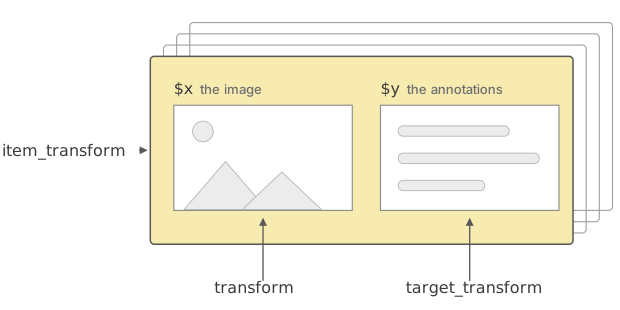
$x and its annotations in $y.A dataset takes up to three transform arguments, and they reach
different depths of the item structure. transform
is handeling x alone, target_transform is
handeling y alone, and item_transform is
handeling the item as a whole.
Classification datasets only offer the first two. Detection and segmentation datasets offer all three, because an image cannot be rotated or cropped without moving its boxes and masks with it.
ds <- coco_detection_dataset(
  train = FALSE,
  download = TRUE,
  transform = \(img) img %>% transform_to_tensor() %>% transform_rgb_to_grayscale(),
  item_transform = \(item) item %>% item_transform_resize(c(480, 640))
)
Transform ordering
When multiple transforms are included in a dataset construction, they are applied in the following order:
transform, applied to imagetarget_transformif any, applied to targetitem_transformapplied to the results of the two previous ones onto both image and targets.
transform_to_tensor is doing more work there than it
looks. A dataset returns x in whatever form it was read in,
which is the (H, W, 3) channel-last native R array out of
base_loader() . The item transforms and the drawing helpers
all want the (C, H, W) tensor that torch models take, so a
detection or segmentation dataset is nearly always built with
transform = transform_to_tensor.
The dataset itself gets a S3 class depending on the computer-vision
task, either object_detection_dataset or
segmentation_dataset is inserted ahead of torch generic
class dataset. That class is what lets you hand a whole
dataset to an item transform:
ds <- item_transform_random_horizontal_flip(ds, p = 0.5)which composes the flip into the dataset’s
item_transform rather than applying it once.
Classification and caption datasets and their items
The simplest items carry no class at all.
mnist_dataset(), cifar10_dataset(),
eurosat_dataset() and the other classification datasets
return a bare list whose y is the class index:
mnist <- mnist_dataset(root = tempdir(), download = TRUE, transform = transform_to_tensor)
str(mnist[1])
#> List of 2
#>  $ x:Float [1:1, 1:28, 1:28]
#>  $ y: int 6
flickr8k_caption_dataset() and
flickr30k_caption_dataset() have the same shape, with a
character vector of captions in y. Nothing dispatches on
these items: an image transform goes in through transform,
and there is no geometry in the target to keep in sync with it.
Detection datasets and their items
coco_detection_dataset(),
pascal_detection_dataset() and the
rf100_*_collection()s give their items the class
image_with_bounding_box and their target the class
object_detection_target.
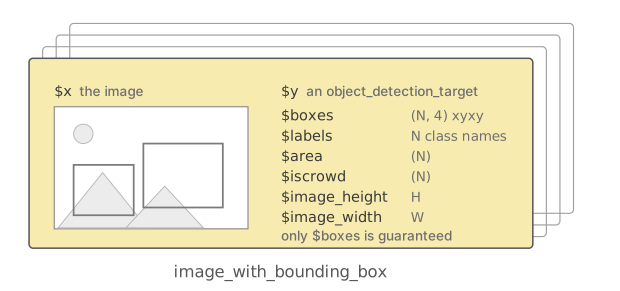
image_with_bounding_box item and
the fields of its object_detection_target.| field | contents |
|---|---|
$boxes |
(N, 4) tensor, one row per object, as
(x_min, y_min, x_max, y_max) in pixels |
$labels |
the class name of each box |
$area |
(N) float tensor, the area of each annotation |
$iscrowd |
(N) boolean tensor, TRUE where the
annotation covers a group of objects rather than one |
$image_height, $image_width
|
the size x had when the boxes were read |
Only $boxes is guaranteed, since that is the field the
class is validated on. The rest is whatever the annotations happened to
carry: the table above is a COCO target, while an RF100 one holds
$boxes, $labels and an $image_id
and nothing else.
draw_bounding_boxes() has a method for the item, so it
finds $x, $y$boxes and $y$labels
on its own:
boxed <- draw_bounding_boxes(ds[1])
tensor_image_browse(boxed)
Rotated box items
Four numbers per box cannot describe a box that has been rotated, so
item_transform_rotate() and
item_transform_affine() return an
image_with_rotated_box instead of the item they were
given:
class(item_transform_rotate(ds[1], angle = 15))
#> [1] "image_with_rotated_box" "list"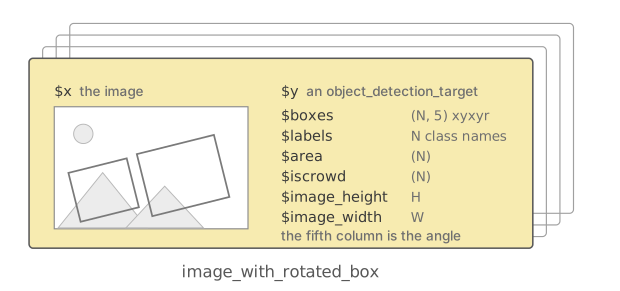
image_with_rotated_box item:
same target fields, but $boxes has a fifth column.The target keeps its object_detection_target class and
its fields, but $boxes gains a fifth column holding the
accumulated angle in degrees, the xyxyr format that
box_xyxy_to_xyxyr() and
target_transform_rotate() produce.
draw_bounding_boxes() has a second method for this class
which draws each box as a polygon through magick rather than as an
upright rectangle.
Every item transform has a method for rotated-box items, except
item_transform_perspective().
Segmentation datasets and their items
coco_segmentation_dataset(),
pascal_segmentation_dataset(),
cityscapes_dataset(),
oxfordiiitpet_segmentation_dataset() and
rf100_peixos_segmentation_dataset() return
image_with_segmentation_mask items whose target is a
segmentation_target.
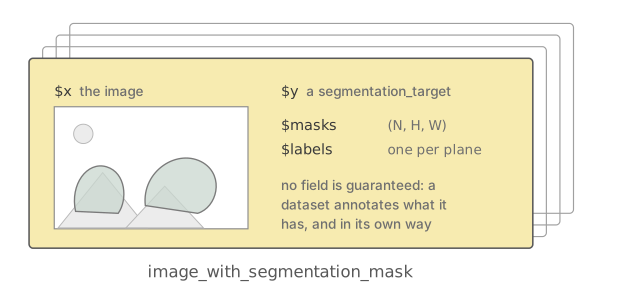
image_with_segmentation_mask
item and its segmentation_target.No field is required here. Segmentation annotations differ far more
between datasets than detection ones do, so each dataset passes on what
it reads: polygons in $segmentation for COCO,
$polygon, $color, $semantic and
$instance for Cityscapes depending on the requested
target_type, one-hot $masks for Oxford-IIIT
Pet and Pascal VOC. $labels is not uniform either: the
detection datasets name their classes, while
pascal_segmentation_dataset() numbers the planes of
$masks that are not empty.
What draw_segmentation_masks() and the segmentation
models want is $masks, an (N, H, W) tensor
with one plane per annotated class. Two target transforms build it from
raw annotations:
| transform | reads |
|---|---|
target_transform_coco_masks() |
$segmentation, the COCO polygons |
target_transform_trimap_masks() |
$trimap, the three-value Oxford-IIIT Pet mask |
seg_ds <- coco_segmentation_dataset(
  train = FALSE,
  download = TRUE,
  transform = transform_to_tensor,
  target_transform = target_transform_coco_masks
)
masked <- draw_segmentation_masks(seg_ds[1])
coco_segmentation_dataset() only promotes its items to
image_with_segmentation_mask once $masks is
there, so without that target transform they stay
image_with_bounding_box. cityscapes_dataset()
has no target transform of its own, and its targets have to be turned
into $masks by hand before they can be drawn.
Slicing an image: sahi_split
SAHI, Slicing Aided Hyper Inference, cuts a large image into
overlapping tiles, runs the model on each and puts the results back
together. The tiling itself is an object:
prepare_sahi_split() measures an image and returns a
sahi_split.
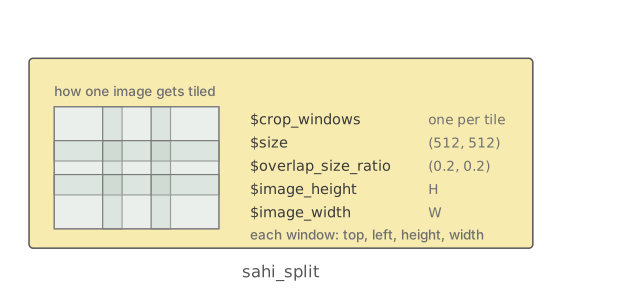
sahi_split, drawn as one card
rather than a deck, because it is computed once and reused across
images.
split <- prepare_sahi_split(c(1000, 1200), size = c(512, 512))
length(split$crop_windows)
#> [1] 9
It holds $crop_windows, one
top/left/height/width
window per tile, and the $size,
$overlap_size_ratio, $image_height and
$image_width it was computed from. Keeping it as its own
object is what lets the same tiling be applied to an image and to its
target, so the two stay aligned:
tiled <- ds[1]
split <- prepare_sahi_split(tiled$x, size = c(256, 256))

crops <- transform_sahi_crop(tiled$x, split)
targets <- target_transform_sahi_crop(tiled$y, split)
transform_sahi_crop() returns the tiles stacked as an
(N, C, H, W) batch.
target_transform_sahi_crop() returns one target per tile,
each box clipped to the tile and shifted into its coordinates, and
$image_height and $image_width set to the size
of the tile rather than of the original image. A box is kept only if
what survives the clip is at least min_area_ratio of its
original area, a tenth by default, so a box grazing the edge of a tile
is dropped from that tile rather than kept as a sliver.
Unlike the item transforms, this pair turns one item into many, so
there is no item_transform_sahi_crop() doing both halves at
once.
Which function takes which class
| family | dispatches on | acts on |
|---|---|---|
transform_*() |
torch_tensor |
the image alone |
prepare_sahi_split() |
numeric, torch_tensor,
magick-image, dataset
|
measures an image, returns a sahi_split
|
target_transform_resize(),
target_transform_rotate(),
target_transform_affine(),
target_transform_sahi_crop()
|
object_detection_target |
the target alone |
target_transform_coco_masks(),
target_transform_trimap_masks()
|
segmentation_target |
the target alone |
item_transform_*() |
image_with_bounding_box,
image_with_rotated_box,
image_with_segmentation_mask, dataset
|
image and target together |
draw_bounding_boxes() |
torch_tensor, image_with_bounding_box,
image_with_rotated_box
|
draws boxes on the image |
draw_segmentation_masks() |
torch_tensor,
image_with_segmentation_mask
|
overlays masks on the image |
The two groups of target transforms are disjoint, which is why they
are two rows and not one. The first group moves boxes and is written for
detection targets only; the second builds $masks out of the
annotations a segmentation dataset carries. Crossing them is an error
rather than a silent no-op, so target_transform_rotate() on
a segmentation_target, or
target_transform_coco_masks() on an
object_detection_target, stops with
not implemented for and the class it was handed.
Both groups also accept bare lists with the fields their transforms require. Transforming a bare list preserves its list class.
The image transforms are written for torch_tensor. Five
of them also take a magick image, transform_crop(),
transform_hflip(), transform_resize(),
transform_sahi_crop() and
transform_to_tensor(), and
transform_to_tensor() alone takes an array, a
matrix or a list, which is how an image coming
off a loader gets into a tensor in the first place.
The item transforms are the most uniform family: each of them takes
all three item classes and a dataset, apart from
item_transform_perspective(), which has no rotated-box
method. Among the target transforms only
target_transform_rotate() takes a dataset as well. The
reference index lists each of these families in full.
draw_keypoints() is not generic: it takes an image
tensor and an (N, K, 2) keypoint tensor.
Calling any of these on something they have no method for stops with an error naming the class it was given, which is usually a sign that a target lost its class somewhere along a pipeline.
Building an item by hand
Target transforms accept a bare list of annotations. When building a complete item for item transforms or drawing functions, give the item its task class; the example also gives the target its corresponding class:
img <- torch_randint(0, 255, size = c(3, 120, 160))$to(dtype = torch_uint8())

y <- list(
  boxes = torch_tensor(rbind(c(10, 20, 60, 90), c(70, 30, 150, 110)), dtype = torch_float()),
  labels = c("cat", "dog"),
  image_height = 120,
  image_width = 160
)
class(y) <- c("object_detection_target", "list")

item <- list(x = img, y = y)
class(item) <- c("image_with_bounding_box", "list")

str(item)
#> List of 2
#>  $ x:Byte [1:3, 1:120, 1:160]
#>  $ y:List of 4
#>   ..$ boxes       :Float [1:2, 1:4]
#>   ..$ labels      : chr [1:2] "cat" "dog"
#>   ..$ image_height: num 120
#>   ..$ image_width : num 160
#>   ..- attr(*, "class")= chr [1:2] "object_detection_target" "list"
#>  - attr(*, "class")= chr [1:2] "image_with_bounding_box" "list"
A segmentation target is built the same way, with
segmentation_target and
image_with_segmentation_mask.
What models return
Model outputs are plain lists and carry no class of their own. The
object detection models return $detections, one element per
image of the batch, each with $boxes, $labels
and $scores; the semantic segmentation models return
$out, the per-class logits. The Visualization utilities article
covers turning either of them into something the drawing helpers can
render.
Comparison with torchvision TVTensors (advanced)
If you have used the v2 transforms of the Python torchvision, these classes cover the same ground as TVTensors, but they are attached one level further out.
A TVTensor is a subclass of torch.Tensor.
Image, Video, BoundingBoxes,
Mask and KeyPoints are tensors that know what
they are, and a BoundingBoxes carries its
format and its canvas_size as attributes of
the tensor itself. A v2 transform walks an arbitrary nested sample, a
dict, a list or a tuple, dispatches on the type of each element it
finds, hands back the same structure, and passes anything it does not
recognise through untouched.
Here the class goes on the list instead. $x and
$y$boxes are ordinary torch_tensors, and what
carries the meaning is image_with_bounding_box on the item
and object_detection_target on y. Four
differences follow from that:
- An item is always
list(x, y)rather than any nesting you like, and the three transform families say which half of it they act on instead of one transform traversing the whole sample. - Box format is not an attribute but the width of
$boxes: four columns are xyxy, five are xyxyr. Whatcanvas_sizeholds lives in$image_heightand$image_widthon the target. - A change of geometry changes the class of the item, so
item_transform_rotate()hands back animage_with_rotated_box. On the Python side the object stays aBoundingBoxesand the distinction lives in itsformat. - There is no heuristic for unwrapped input. A v2 transform whose
sample holds no
Imagewill treat the first plain tensor it finds as the image; here a list without its class is an error, not a guess.
Two of the five TVTensors have no counterpart here. There is no video
support at all, and keypoints are not a class:
draw_keypoints() takes an image tensor and a keypoint
tensor and nothing dispatches on either.